
Instagram Grid Layout Guide: Split a Photo into 9 Tiles
Split a photo into nine Instagram tiles. Follow the actual controls, compare tile shapes, download the ZIP, and check cropping and posting order.
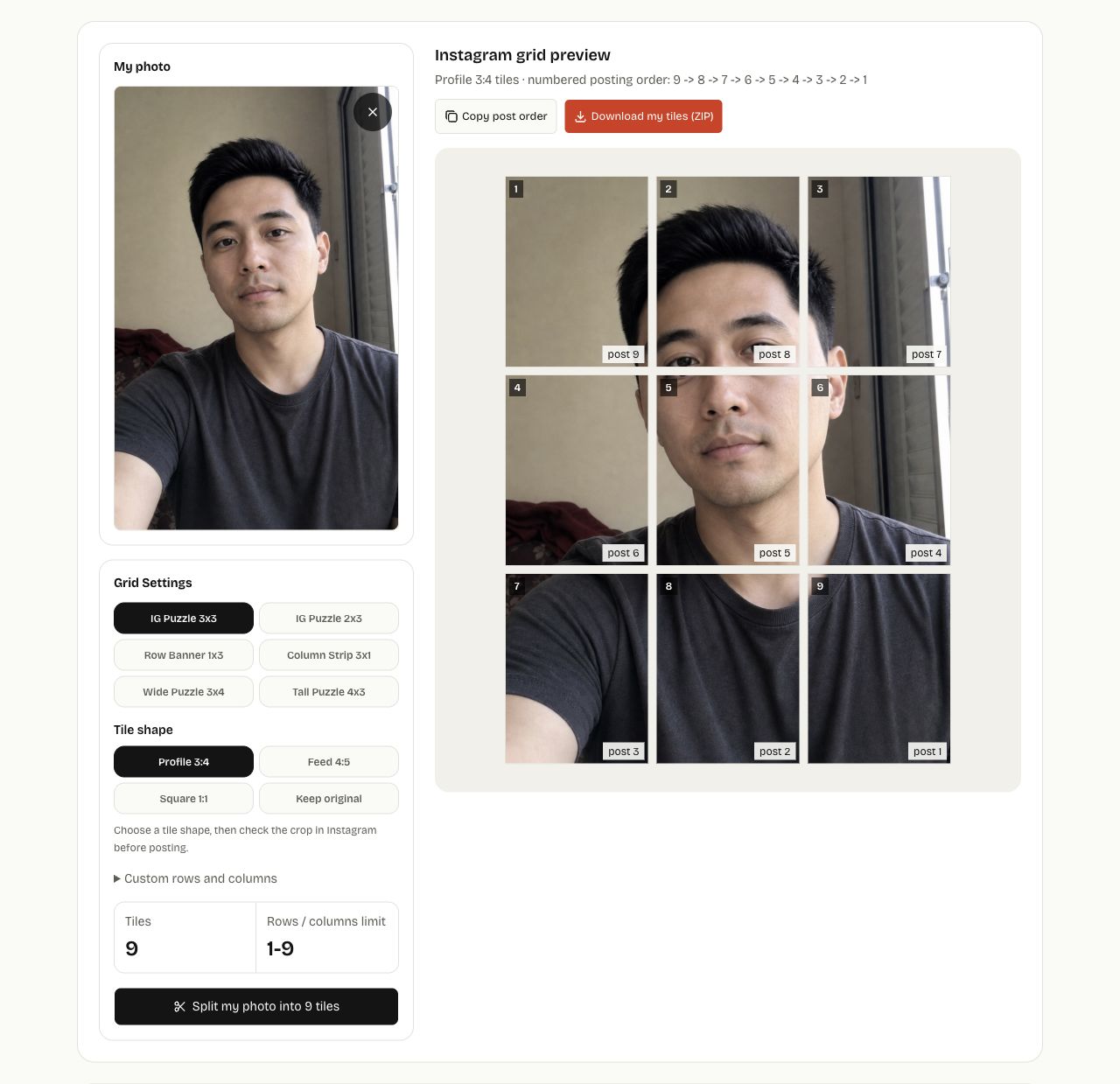
To split one photo into nine Instagram tiles, open Instagram Grid Splitter, add your photo, select IG Puzzle 3x3, choose a tile shape, and click Split my photo into 9 tiles. Download the ZIP and use the filenames' post numbers to check the suggested posting order. The tool creates image files; you publish them yourself.
Do you need a collage, carousel, or split grid?
| What you want to make | Start here | What you get |
|---|---|---|
| Several photos together in one post | Instagram 3×3 Photo Grid | One collage image |
| Separate photos that people swipe through | Prepare the images, then use Instagram's carousel posting flow | A set of photos in one post |
| One picture spread across separate profile posts | Instagram Grid Splitter | Separate tiles in a ZIP |
This tutorial follows the third workflow. A 3×3 collage does not produce nine separate posts.
Prepare a photo with room around the subject
Use a JPG, PNG, or WebP with one clear subject. Leave space around faces and important text: the selected tile shape can crop the outside of the image, and the grid can divide details between posts. Start from your largest original file rather than a small preview downloaded from a chat.
To follow the example, save the 1003×1568 px source portrait and upload that file.

The free splitter processes the selected photo in your browser, requires no account, and adds no watermark. It does not move the subject within a crop. If a face needs repositioning, prepare that crop in your photo editor before uploading.
Split the photo using the actual controls
- Open Instagram Grid Splitter and select Choose my photo. Choose one image. Try a sample is available if you want to explore the controls first.
- Under Grid Settings, choose IG Puzzle 3x3. The Tiles count should show 9.
- Under Tile shape, select Profile 3:4 for this example. The label describes each tile, not the entire profile or an automatic Instagram setting.
- Click Split my photo into 9 tiles. Inspect the generated tiles: this is the result after the centered crop, whereas the initial grid overlay is drawn over the source photo.
- Check the outer edges, face, and tile boundaries. If you change a layout or shape, click the split button again to create the new files.
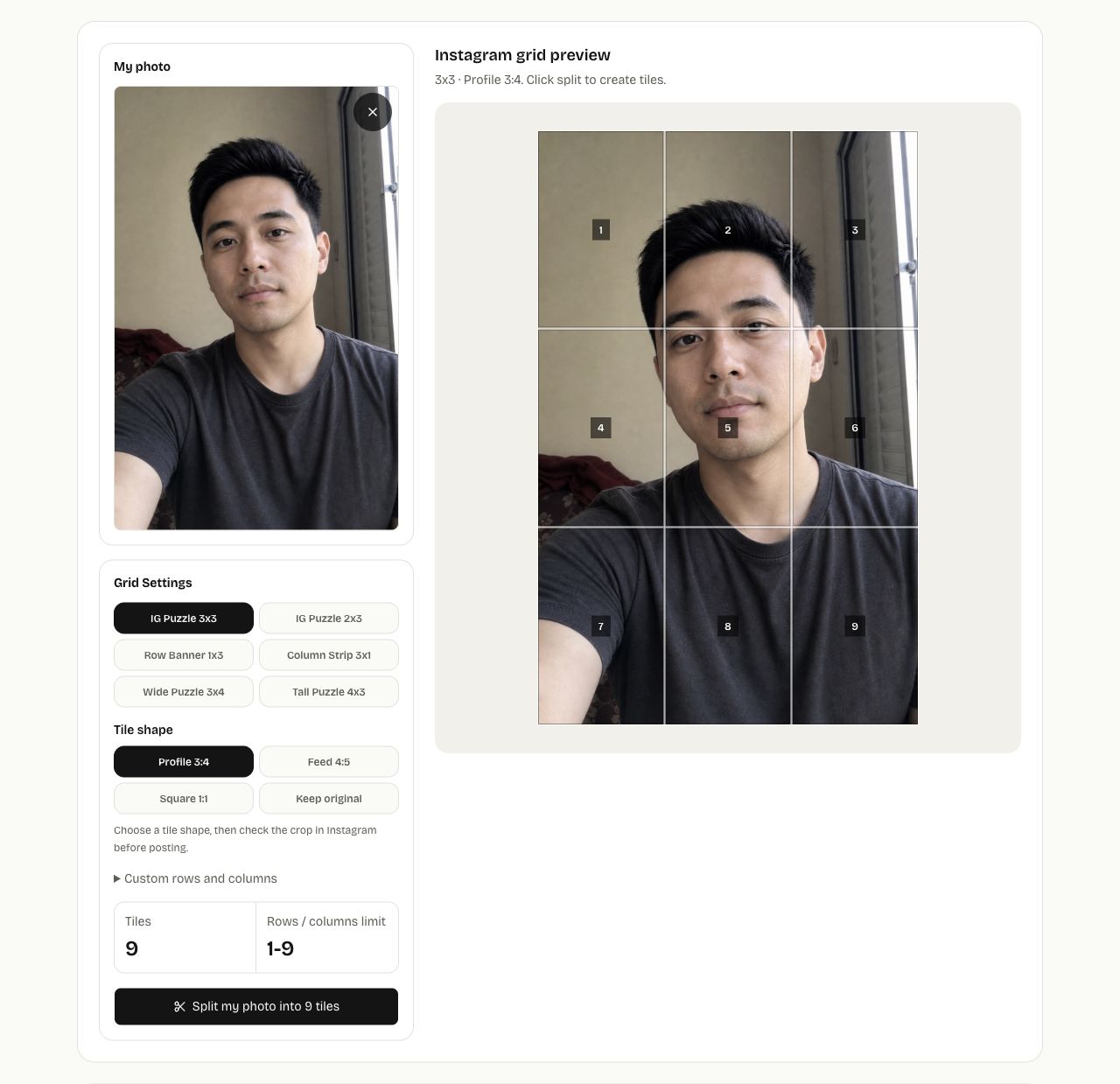
The same controls offer IG Puzzle 2x3 for six tiles and Row Banner 1x3 for three. Use Custom rows and columns only when a preset does not fit your plan.
Compare the tile shapes before downloading
| Tile shape | What the splitter does | What to check |
|---|---|---|
| Profile 3:4 | Crops the source centrally to fit tiles with a 3:4 ratio | Whether the outside of your composition survives the crop |
| Feed 4:5 | Uses the same centered-crop approach with 4:5 tiles | Whether the wider tiles suit your subject |
| Square 1:1 | Crops to fit square tiles | Faces, lettering, and objects near the top or bottom |
| Keep original | Divides the source without a fixed tile-ratio crop | The resulting shape of each tile |
For a 3×3 layout, the whole joined image has the same aspect ratio as one tile because the row and column counts are equal. A different row count changes that relationship. Always inspect the generated result instead of choosing a ratio from the name alone.
Download the ZIP and read the posting order
Click Download my tiles (ZIP) to save instagram-grid-3x3.zip. Unzip it before selecting photos to post. You can also click a tile in the preview to download that one PNG, or use Copy post order to copy the suggested sequence.
The preview's tile numbers run from left to right, starting at the top. The ZIP filenames include a separate posting number:
| Example filename | Position in the joined picture | Suggested posting position |
|---|---|---|
instagram-grid-3x3-post-01-tile-09.png | Bottom right | First |
instagram-grid-3x3-post-02-tile-08.png | Bottom middle | Second |
instagram-grid-3x3-post-09-tile-01.png | Top left | Ninth |
Follow post-01, post-02, … post-09, which corresponds to tiles 9, 8, … 1. A single-tile download uses the tile number in its filename, so do not treat that number as the posting order.
Download an example 3×3 ZIP to inspect the files. This example contains nine 334×445 px PNGs using Profile 3:4. These dimensions describe this sample, not every upload.
Before publishing a full set, inspect how a tile appears in Instagram's posting and profile previews. Existing pinned or rearranged posts can affect the intended layout. The tool's file order cannot guarantee how every profile will display it.
Fix common split-grid problems
| Problem | What to change |
|---|---|
| A face or logo is cut off at the outside edge | Try another tile shape, or crop and reposition the source in a photo editor before uploading again |
| A word crosses a tile boundary | Move the text in the source image, or use one collage so the word stays together |
| The tiles look different from the initial overlay | Inspect the generated tiles after clicking the split button; fixed tile shapes apply a centered crop |
| The joined picture is in the wrong order | Check the ZIP's post number separately from its tile number |
| Individual files look soft | Use a larger original and inspect one downloaded tile at its intended display size |
Common questions
Will every tile be 1080 pixels wide?
No. The tool first limits the source to 4000 pixels on its longest edge, then divides the cropped image. Each tile is capped at 1080 pixels wide, but smaller source sections produce smaller tiles. A 3×3 Profile 3:4 layout can reach the source-height limit before that width cap. Splitting a small image does not create additional detail.
Does the ZIP include the numbers and gaps shown in the preview?
No. The labels and spacing help you inspect the preview. The downloaded PNGs contain the image sections, without those interface labels or gaps.
Can the splitter upload or schedule my posts?
No. It creates PNG files and a suggested order. You choose and publish the files in Instagram yourself.
When is a collage the simpler choice?
Use a photo collage when the pictures should stay together in one image. Use the Instagram grid splitter when separate profile tiles are the intended result and you are ready to check their arrangement before publishing.