

Standard Line Grid
Classic clean lines for most drawing projects.
Free browser tool
Add a drawing grid to any photo online. Choose rows, columns, colors, and line styles. Free, no signup, no upload, no watermark.
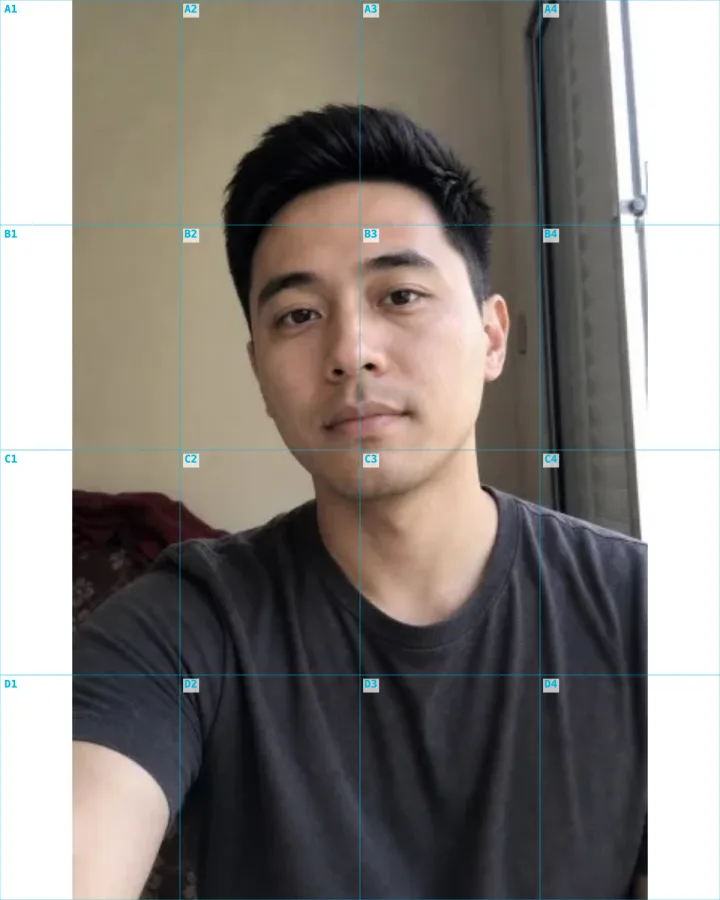
Blank Portrait 4:5 grid, 4 rows x 4 columns
Examples
Real creator workflows: profile grids, portrait references, and post-ready exports.

Classic clean lines for most drawing projects.

Subtle intersections for detailed references.

Balanced reference lines over portraits and scenes.
Select any photo from your device or use a sample image.
Adjust grid size, opacity, color, thickness, and style.
Save the finished grid reference for printing or digital use.
The grid method divides a reference photo into squares so artists can transfer proportions accurately.
Use larger cells for basic proportions and smaller cells for detailed portraits or architecture.
Yes. You can adjust color, opacity, thickness, and style before downloading.
JPG, PNG, and WebP images are supported.
The grid method is a centuries-old drawing technique: you overlay an even grid on your reference photo, draw the same grid on your paper or canvas, then copy the image one square at a time. Because your eye only has to focus on the small shapes inside a single cell, proportions and placement come out accurate even on a complex subject — which is exactly why it has been a staple from the Renaissance masters to modern drawing classes.
It is not tracing. The grid is a measuring aid, not a shortcut around drawing, so the skill still comes from your hand. What it removes is the guesswork of judging large distances by eye, which is where most beginner drawings drift out of proportion.
More squares mean more reference points and more accuracy, but also more to manage. For a quick gesture or a simple object, a coarse grid of a few large cells is plenty; for a detailed portrait, architecture, or anything with fine features, smaller cells give you the control to place every edge precisely.
A practical starting point is a grid where each cell frames roughly one feature — an eye, a window, a hand. If you find yourself guessing inside a square, it is too big; add rows and columns until each cell holds an amount you can copy confidently.
The trick to scaling a drawing up or down is keeping the same number of squares on both the reference and the surface. Draw the identical grid count lightly on your paper, and each photo cell maps to exactly one paper cell regardless of size — a small reference and a large canvas can share the same nine-by-twelve grid.
Match the aspect ratio of the grid to your paper so squares stay square and nothing stretches. Choosing a printable paper size for the overlay up front means the reference lines up with a standard sheet or canvas without awkward cropping.
A grid only helps if you can see it against the photo. Light lines read well over dark or busy images, while darker lines suit bright, low-contrast photos; lowering the opacity keeps the grid visible without burying the detail you are trying to copy. Adjusting thickness and style — solid, dashed, or dotted — lets the lines guide without competing with the picture.
Numbered or lettered cells make it easier to keep your place on a large drawing, so you always know which square you are working on when you look back and forth between the reference and the canvas.
The same overlay grid scales any image by hand, not just pencil drawings. Muralists grid a wall to enlarge a small sketch, embroiderers and cross-stitchers use grids to map a pattern stitch by stitch, and crafters use them to transfer a design onto fabric, wood, or glass.
Anywhere you need to reproduce an image at a different size with accurate proportions, a grid overlay turns one big, intimidating task into a series of small, manageable squares. The reference downloads as a clean image you can print or keep on a second screen while you work.
AI showcase
Use the free browser tool for the base export, then open an AI template when you want a generated style.
4:5 · street portrait poster2 credits
Build a street portrait with a stylized illustrated companion from one upload.
Use this style4:5 · typographic portrait2 credits
Transform one portrait into a high-contrast calligraphic text artwork.
Use this style1:1 · 3x3 icon system2 credits
Generate a cohesive 3x3 icon family from one theme or brand reference.
Use this style1:1 · 3x3 fashion grid2 credits
Create a clean editorial 3x3 fashion contact sheet from one portrait.
Use this style