
Photo Grids for Artists: Reference, Blank Guide, and Process Collage
Choose a drawing reference grid, printable blank guide, or process collage. Learn matching-grid checks, print limits, and when to preserve the original reference.
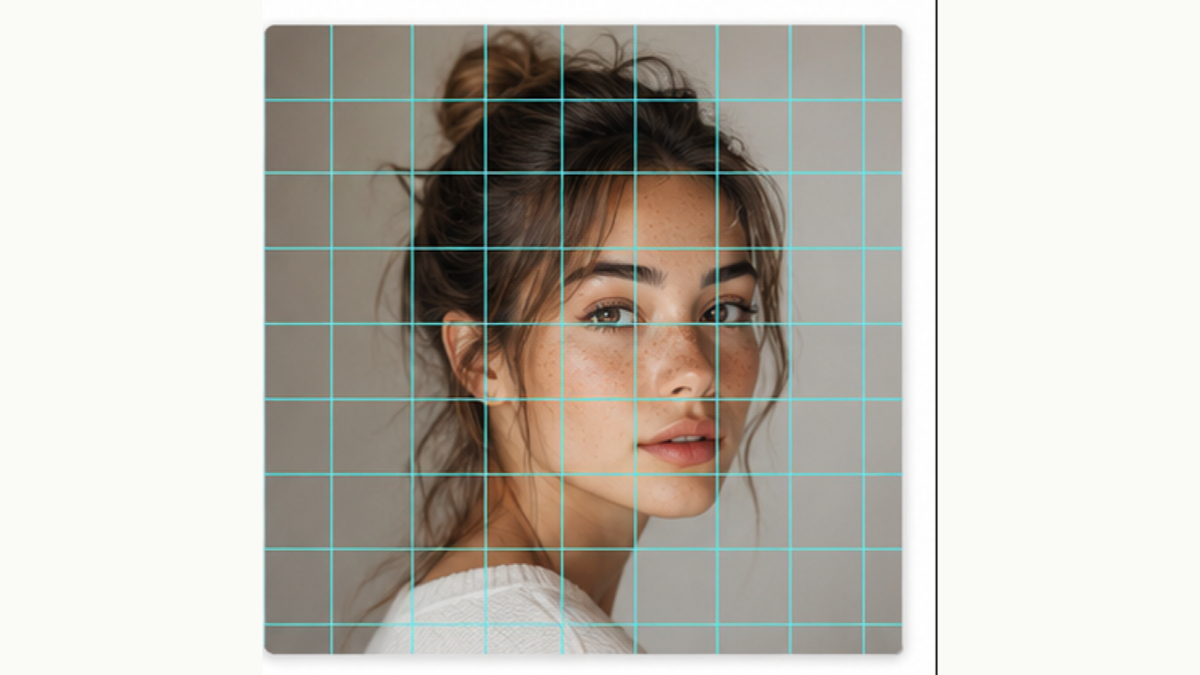
Artists use “photo grid” for two different jobs: transferring a reference by hand and presenting several images together. Choose a drawing overlay for proportions, or a collage for showing a process.
Add lines to an existing drawing reference
Use Photo to Grid when you already have a portrait, still life, or landscape. Choose the paper shape, row count, and column count. Inspect the contain or crop setting so the subject matches the drawing you intend to make.
Copy the same grid count onto your drawing surface. The cell size can change when you enlarge the work, but the rectangle’s aspect ratio and row-to-column structure must remain consistent. See the portrait grid tutorial for a worked scale example.
Make a blank grid for practice
Use Grid Maker without a reference image, or hide the photo before export. You can adjust line weight, opacity, color, and labels. A light grid is useful for drawing over; darker lines can be easier to see on a reference sheet.
The advanced grid download is 2400 pixels wide. Its paper preset controls shape; printer scaling controls the physical size. Measure a printed cell when the exercise needs a precise scale.
Show the reference, sketch, and finished piece
Use Photo Grid Collage to combine existing images into one process board. A 1×3 row works for reference, study, and result. A 2×2 grid gives a fourth cell for a detail crop.
All collage cells have equal dimensions. Photos are cropped to fill them, so check that signatures and edges remain visible. The standard collage export is about 1080 pixels wide and is intended as an image download, not a layered project file.
Keep the reference and transformed image distinct
Line, sketch, and watercolor effects can provide alternative studies. Compare them with the original before using them as drawing evidence: they may simplify edges or tone. AI enhancement is a separate credit-based workflow and may alter details, so preserve the original reference when accuracy matters.