HomeBlogHow to Use Grid Method for Perfect Portraits

How to Use Grid Method for Perfect Portraits

June 25, 202310 min readTutorial
Portrait with grid overlay example

Portrait drawing is one of the most challenging subjects in art. The human brain is specifically wired to recognize faces, meaning even small errors in proportion can make a portrait look "off." This is why the grid method has become an invaluable tool for artists from beginners to professionals alike.

Why the Grid Method Is Essential for Portrait Artists

Compared to other subjects, portraits present unique challenges:

  • Even minor proportional errors dramatically affect likeness
  • Complex spatial relationships exist between facial features
  • Subtle variations in expression change the entire mood
  • Viewers have an exceptionally high sensitivity to facial accuracy

The grid method breaks down the complex human face into manageable sections, allowing artists to focus on one detail at a time while maintaining overall proportional accuracy.

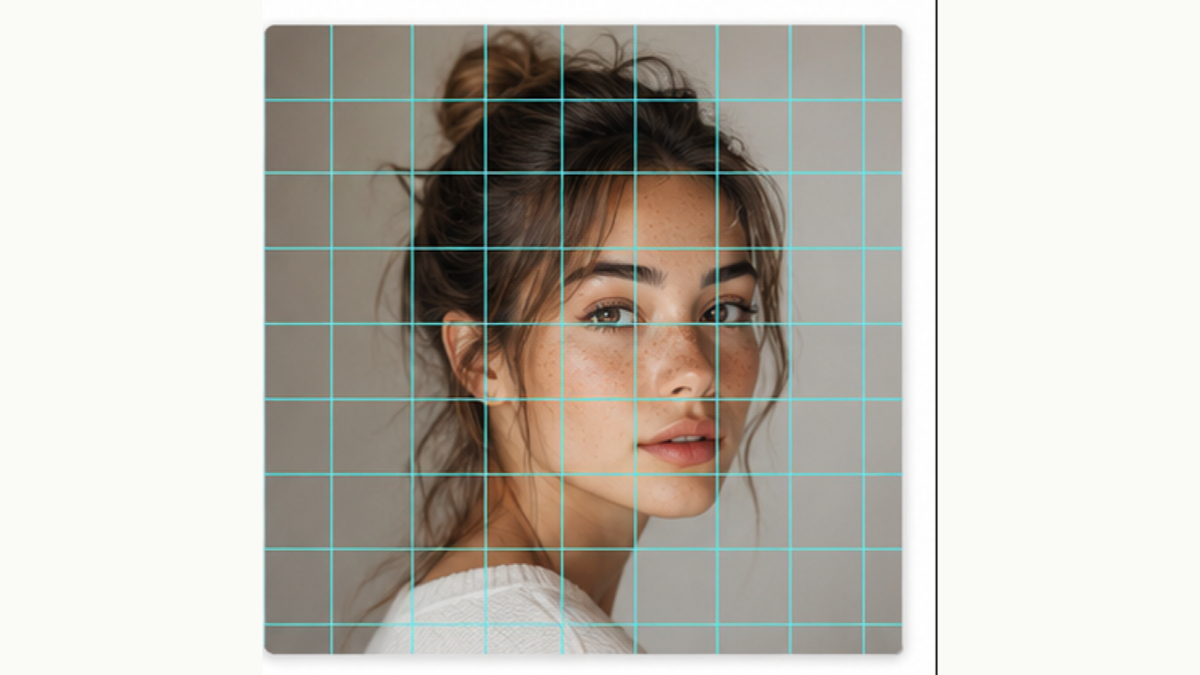
Female portrait with grid overlay

Female portrait demonstration with grid method application

Key Facial Proportions to Master

Understanding basic facial proportions is incredibly helpful when using the grid method for portraits:

  1. Eye level: Eyes typically fall at the halfway point of the head's vertical height
  2. Eye spacing: The distance between eyes is approximately equal to one eye width
  3. Nose length: From brow to tip generally occupies about one-third of the face's central length
  4. Mouth position: The mouth usually sits about one-third of the way between the nose base and chin
  5. Ear placement: Ears typically align from eyebrow height to nose base height

The beauty of the grid method is that even if you don't memorize these "standard" proportions, you can still accurately capture an individual's unique facial proportions using the grid reference from your photo.

Step-by-Step Grid Method for Portraits

1. Select an Appropriate Reference Photo

A good reference photo is critical to a successful portrait. Ideal portrait references should have:

  • Clear facial features with even lighting
  • Minimal extreme shadows that might obscure details
  • Natural expression that captures the subject's personality
  • High resolution with sharp details

2. Apply a Grid Overlay

Using our photo grid tool, apply a grid to your reference photo:

  • For portraits, a 10×10 or denser grid is recommended
  • Choose a grid color that contrasts well with your photo
  • Adjust opacity to ensure grid lines are visible without obscuring details
Male portrait with grid application

Male portrait photo with grid overlay applied

3. Create a Corresponding Grid on Your Drawing Surface

On your paper or canvas:

  • Ensure your grid's proportions match the reference grid exactly
  • Use light pencil lines that can be easily erased later
  • Consider numbering or lettering your grid rows and columns for easier orientation

Pro Tip: Variable Density Grids

For portraits, consider using a "variable density grid" — more grid lines (smaller squares) in the facial area, and fewer lines in the hair and background areas. This provides more detailed reference points where precision matters most.

4. Begin with Major Shapes

Before diving into details, establish the main structural elements:

  • Overall head shape and angle
  • Hairline position
  • Approximate locations of main facial features (eyes, nose, mouth)

Remember the "general to specific" principle of drawing — establish the overall structure before adding details.

5. Work Grid by Grid

Now begin meticulously drawing each grid square's contents:

  • Focus on one grid square at a time
  • Observe the shapes and lines within each square rather than trying to identify "what you're drawing"
  • Pay special attention to the angles and curves of lines in each square
  • Note the negative spaces (spaces between features) as well
Portrait in progress with grid

Portrait drawing in progress using the grid method

6. Focus on Critical Detail Areas

In portraits, certain areas require special attention:

Eyes

Eyes are typically the focal point of any portrait. Note the exact shape of the eyes, iris position, pupil size, eyelash direction, and subtle textures of eyelids or surrounding skin.

Nose

Many artists find the nose one of the most challenging facial features. The grid helps accurately capture the nose's angle, width, and wing structures.

Lips

The shape and fullness of lips greatly impact a person's expression. Pay attention to the proportion of upper to lower lip, the corners, and the subtle line of the mouth.

Eyebrows

Eyebrows are crucial for expression. Note their arch, thickness, and direction, as well as their relationship to the eyes.

7. Check Key Proportions

Periodically step back and review the overall proportions:

  • Is the distance between features accurate?
  • Does the head-to-neck angle look natural?
  • Are the two sides of the face balanced (accounting for natural asymmetry)?

8. Add Details and Textures

Once your basic shapes and proportions are accurate, begin adding finer details:

  • Skin texture and tone variations
  • Hair direction and texture
  • Subtle variations in feature shadows and highlights

9. Erase Grid Lines

When your portrait is complete, carefully erase the grid lines, or in digital drawing, hide the grid layer.

Common Challenges and Solutions

Capturing Likeness

Even with a grid, capturing true likeness can be challenging. Beyond proportions, pay attention to:

  • Individual characteristics: Every person has unique features like specific laugh lines, eye expressions, or dimples
  • Subtle asymmetries: Human faces are naturally asymmetrical, and these small differences are crucial for likeness
  • Character expression: Try to capture the mood and personality visible in the photo

Handling Hair

Hair is often one of the most challenging elements when using the grid method:

  • Use the grid to establish the overall hair shape and main divisions
  • Focus on light and dark areas rather than trying to draw individual strands
  • Pay special attention to the hairline where it meets the face, as this significantly impacts likeness

Portrait Grid Quick Tips

  • Use a finer grid (more squares) for portraits than you would for landscapes or still lifes
  • Pay extra attention to the eyes — they're typically the focal point of any portrait
  • Double-check the angle of the head and neck — a common source of errors
  • Don't neglect the negative spaces between facial features
  • Beginners should start with front-facing portraits before attempting profiles or three-quarter views

Transitioning From Grid to Freehand

As you gain experience, you'll find yourself becoming less dependent on grids:

  • Start by using fewer grid lines (e.g., reducing from 10×10 to 6×6)
  • Practice quick sketches with just a few key proportion lines (eye level, centerline, etc.)
  • Try drawing freely first, then use a grid to check your proportions

Even professional artists often use the grid method for complex projects, especially commissioned portraits where accuracy is paramount.

Enhance Your Portrait Drawing with PhotoGrid.space

Our Photo Grid Maker tool is specifically designed for portrait artists, offering features to simplify the grid creation process:

  • Customizable grid density for different portrait complexity levels
  • Adjustable grid colors and opacity to work with any photo
  • Option to choose between line, dot, or dashed grid styles
  • Portrait-optimized settings that highlight key facial features

With our tool, you can create the perfect grid reference for any portrait photo in seconds, allowing you to focus on the creative aspects of your artwork.

Conclusion

The grid method is a powerful tool for portrait artists at all skill levels, helping create accurate, compelling portraits that truly capture your subject's likeness. By breaking down the complex human face into manageable sections, you can focus on one area at a time while maintaining overall proportional accuracy.

Whether you're just beginning your artistic journey or looking to refine your portrait skills, the grid method provides the structure and precision needed to create stunning portrait art.

Ready to elevate your portrait drawing? Try our PhotoGrid.space tool to create your first portrait grid reference today!

Ready to Try the Grid Method?

Create your own grid overlay on any photo with our free tool.

Try Photo Grid Maker Free

Related Articles

Related article
Techniques

Digital Art with Photo Grid: Modern Techniques

Explore how digital artists are using grid methods to create stunning digital paintings and illustrations.

Related article
Techniques

Landscape Photo Grid Mastery: From Photo to Canvas

Master the art of transforming landscape photographs into perfect grid references for your paintings.

Ready to Elevate Your Portrait Skills?

Create perfect grid references for your next portrait project with our free tool.